Up to now we’ve built the robust design up from first principles. You know what the model’s doing, why it needs two time scales, what each parameter means, and where all the ambiguous zeros are hiding. Time to actually point it at some data.
This page is the practical one. Less theory, more code. By the end you’ll be able to take a real robust design dataset, bully it into the right shape, fit a model with covariates, and draw figures that actually say something about what you found. This is the page you’ll be flicking back to when you’re elbow-deep in your own data and can’t remember which argument goes where.
We’re sticking with RMark the whole way. Quick reminder: RMark is just an R front end for program MARK, which you have to install separately. If you haven’t done that yet, grab it here.
What should influence your parameters?
Before you fit anything, stop and think hard about which covariates go where. This is a biological question, not a statistical one, and if you get it wrong here then it doesn’t matter how cleanly the model runs, it won’t be describing the real world.
The full robust design has four parameters, and each one means something different biologically. That biology is what should be steering your covariate choices, so let’s take them one at a time.
What influences survival (\(\phi\))?
Survival is estimated between primary periods, so the covariates that belong here are things that vary between those periods and could plausibly tip an animal towards living or dying.
Body condition is the classic one. An animal going into winter in poor nick is less likely to see spring. Age matters for most species, with survival usually lowest in juveniles and the very old. Sex can matter if males and females are up against different predation or energetic demands. Conditions between periods get thrown in a lot too: how brutal the winter was, how bad the drought got, how much food was about. And if you ran any interventions, supplementary feeding, a predator cull, a disease treatment, those go here as well.
The question to keep asking yourself is: between two of my sampling occasions, what decided whether an animal was still alive at the next one?
What influences detection (\(p\))?
Detection is estimated within primary periods, out of the pattern across your secondary occasions. So covariates here need to vary at the secondary occasion level, across the repeated visits inside a single primary period, and plausibly change how likely you are to catch or spot an animal that’s genuinely there.
Weather on the day is the obvious one: rain, temperature and wind all mess with trap success and how well an observer can see. Time of day matters for plenty of species. Effort belongs here too if it wobbled between occasions, like how many traps you set or how many hours you searched. And if different people did the sampling, who was out that day can go in as well.
The question here is: across my repeated visits within a season, what made me more or less likely to detect an animal that was actually sitting right there?
What influences availability (\(\gamma'\) and \(\gamma''\))?
Availability is about whether an animal is even in your study area during a primary period at all. So covariates here should be the things that push animals in and out of the study area between periods.
Season is the big one, especially for anything migratory. A covariate that just flags breeding versus non-breeding season will soak up a lot of predictable coming and going. Good habitat outside your study area might tempt animals away. And for some species reproductive stage counts: pregnant or lactating females often sit tighter to a site than animals that aren’t breeding.
The structure of covariates in RMark
RMark splits covariates into two kinds.
Individual covariates are fixed traits of an animal: sex, age at first capture, a body condition measured just the once. Each one goes straight into the data frame as its own column next to ch, a single value per row.
Time-varying covariates change from occasion to occasion: the temperature on each sampling day, the season at each primary period. For survival and availability these vary at the primary period level, so you add them as numbered columns (varname1, varname2, and so on, one per primary period). For detection they vary at the secondary occasion level, so you add one column per secondary occasion across the whole study. RMark reads the number on the end and lines each value up with the right row of the design matrix for you.
How should your data be organised?
The capture history string
The basic unit of data in RMark is the capture history string: one string of 1s and 0s per animal, a single digit for every sampling occasion.
A robust design with 3 primary periods of 3 secondary occasions each gives you a 9-character string. Six primary periods of 3 secondary occasions gives you 18. The order is all the secondary occasions of primary period 1, then all of primary period 2, and so on down the line.
Animal tagged in period 1, missed in period 2, detected in period 3:
Primary 1       Primary 2       Primary 3
s1 s2 s3        s1 s2 s3        s1 s2 s3
1  1  0         0  0  0         0  1  1

String: "110000011"
The data frame you hand to RMark needs, at the bare minimum, a column called ch holding these strings. Individual covariates ride alongside as extra columns. Time-varying covariates go in as those numbered column sets.
Let’s simulate a dataset to play with. We’ll use body condition as an individual covariate that drives survival, and temperature as a time-varying covariate that drives detection.
Code
library(RMark)library(ggplot2)library(dplyr)library(tidyr)set.seed(1988)N_true <-400phi_int <-0.75# Baseline survival (logit scale intercept)phi_cond <-0.50# Effect of body condition on survival (logit scale)p_int <--0.40# Baseline detection (logit scale intercept)p_temp <-0.60# Effect of temperature on detection (logit scale)gp_true <-0.40# GammaPrime: prob of staying unavailablegdp_true <-0.20# GammaDoublePrime: prob of becoming unavailablen_primary <-6n_secondary <-3n_occasions <- n_primary * n_secondary# Individual covariate: one value per animalbody_condition <-rnorm(N_true, mean =0, sd =1)# Occasion-level covariate: one value per animal per secondary occasiontemp_matrix <-matrix(rnorm(N_true * n_occasions, mean =0, sd =1),nrow = N_true,ncol = n_occasions)# Simulate survivalalive <-matrix(0, nrow = N_true, ncol = n_primary)alive[, 1] <-1for (t in2:n_primary) { phi_i <-plogis(phi_int + phi_cond * body_condition) alive[, t] <-rbinom(N_true, 1, alive[, t -1] * phi_i)}# Simulate availabilityavail <-matrix(0, nrow = N_true, ncol = n_primary)avail[, 1] <-1for (t in2:n_primary) {for (i in1:N_true) {if (alive[i, t] ==0) { avail[i, t] <-0 } elseif (avail[i, t -1] ==1) { avail[i, t] <-rbinom(1, 1, 1- gdp_true) } else { avail[i, t] <-rbinom(1, 1, 1- gp_true) } }}# Simulate detection incorporating temperature effectdet <-matrix(0, nrow = N_true, ncol = n_occasions)for (t in1:n_primary) {for (s in1:n_secondary) { col <- (t -1) * n_secondary + s p_col <-plogis(p_int + p_temp * temp_matrix[, col]) det[, col] <-rbinom(N_true, 1, avail[, t] * p_col) }}# Keep only animals detected at least onceever_seen <-rowSums(det) >0det_seen <- det[ever_seen, ]cond_seen <- body_condition[ever_seen]temp_seen <- temp_matrix[ever_seen, ]n_seen <-nrow(det_seen)
Code
# Build capture history stringsch_strings <-apply(det_seen, 1, paste, collapse ="")# Start data frame with ch and individual covariaterd_df <-data.frame(ch = ch_strings,body_cond = cond_seen,stringsAsFactors =FALSE)# Add temperature as time-varying columns: temp1 through temp18# RMark matches these to detection occasions by column numbertemp_cols <-as.data.frame(temp_seen)colnames(temp_cols) <-paste0("temp", 1:n_occasions)rd_df <-bind_cols(rd_df, temp_cols)
The data frame now holds ch, the individual covariate body_cond (body condition), and 18 temperature columns, temp1 through temp18. When you drop temp into the detection formula, RMark uses that number on the end to match each temperature to the sampling occasion it belongs to.
Right, let’s actually look at the thing, because this is the exact shape your own data needs to be in before RMark will touch it. It’s too wide to sensibly print all 20 columns at once, so here are the first six animals with just the first three temperature columns (I’ve rounded the covariates to two decimals so the table stays readable):
Code
# First 6 animals: ch, the individual covariate, and the first 3 temp columnspreview <-head(rd_df[, c("ch", "body_cond", "temp1", "temp2", "temp3")])preview$body_cond <-round(preview$body_cond, 2)preview[, c("temp1", "temp2", "temp3")] <-round(preview[, c("temp1", "temp2", "temp3")], 2)preview
And the full dimensions, so you can see how many animals made it through the “detected at least once” filter and the total number of columns:
Code
dim(rd_df)
[1] 365 20
Read one row at a time. The ch string is that animal’s whole 18-occasion detection history: six primary periods of three secondary occasions each, stitched end to end into one string of 1s and 0s. body_cond is its single body-condition value, and it’s the same number all the way across the row, because body condition is a property of the animal rather than of any one sampling day. Each temp column is the temperature on one specific secondary occasion, so those numbers do change across the row. Your own data wants to look exactly like this: one row per animal, one ch string, your individual covariates as single columns, and any time-varying covariate spread across one numbered column per occasion.
Setting up time.intervals
The time.intervals argument is how you tell RMark which gaps between consecutive occasions sit inside a primary period (closed, so 0) and which ones jump between primary periods (open, so 1). There’s one entry per gap, so 18 occasions means 17 gaps.
Inside primary period 1 (occasions 1, 2, 3) gaps 1 and 2 are 0. The jump from primary period 1 to 2 is gap 3, so that’s a 1. Same pattern all the way along.
Always check the length: it has to come out to (n_primary * n_secondary) - 1.
Code
cat("Length of time_intervals:", length(time_intervals),"\nExpected:", n_primary * n_secondary -1)
Length of time_intervals: 17
Expected: 17
Writing out the model
Before you type a single line of R, write the whole model out by hand. Three reasons. It drags every assumption you’re making out into the open. It means your methods section is basically written already. And it catches the moments where your biological thinking and your actual code have quietly drifted apart from each other.
\(z_{i,t}\) is the true alive/dead state of individual \(i\) at primary period \(t\)
\(\phi_{i,t}\) is apparent survival from primary period \(t\) to \(t+1\), varying by individual through body condition
\(\beta_0\) is the survival intercept and \(\beta_1\) is the effect of body condition
\(a_{i,t}\) is the availability state of individual \(i\) at primary period \(t\), conditional on being alive
\(\gamma''\) is the probability of becoming unavailable given currently available
\(\gamma'\) is the probability of staying unavailable given currently unavailable
\(\omega_{i,t}\) is 1 if individual \(i\) was detected at least once during primary period \(t\), 0 otherwise
\(\tilde{p}_t\) is the effective detection probability across all \(s\) secondary occasions
\(p_{i,t,s}\) is detection probability on secondary occasion \(s\) of primary period \(t\), varying by temperature
\(\alpha_0\) is the detection intercept and \(\alpha_1\) is the effect of temperature
Once it’s laid out like that, turning it into RMark formula syntax is almost mechanical. \(\beta_0 + \beta_1 \times \text{Condition}\) becomes ~ body_cond. \(\alpha_0 + \alpha_1 \times \text{Temperature}\) becomes ~ temp. The gammas are held constant here, so they each just get ~ 1.
The beta table hands you every parameter estimate on the logit scale, along with standard errors and confidence intervals. The row names line up straight with the model equations: S:(Intercept) is \(\beta_0\), S:body_cond is \(\beta_1\), p:(Intercept) is \(\alpha_0\), and p:temp is \(\alpha_1\).
Visualising the results
Every predicted-relationship figure in this tutorial runs on the same four steps. Learn them once here and you can draw any parameter, from any model, for the rest of your career.
Step one: pull the coefficients out of the beta table. The table gives you an estimated intercept and slope for each parameter, on the logit scale. For a survival model with one covariate that’s the intercept (\(\beta_0\)) and the slope (\(\beta_1\)). For detection it’s the same pair, \(\alpha_0\) and \(\alpha_1\). Grab the standard errors for both while you’re there, you’ll want them in step three.
Step two: build a covariate sequence and predict on the logit scale. Make a vector of evenly spaced values covering the range of your covariate. For each value \(x\), work out \(\beta_0 + \beta_1 \times x\). That’s your prediction on the logit scale, right across the range.
Step three: get the uncertainty, using the delta method. You can’t just add and subtract 1.96 standard errors from the prediction, because the prediction is stitched together from two uncertain things at once, the intercept and the slope. The delta method deals with both. On the logit scale the variance of \(\beta_0 + \beta_1 \times x\) is:
That covariance term \(\text{Cov}(\beta_0, \beta_1)\) comes out of the model’s variance-covariance matrix (rd_fit$results$beta.vcv), indexed by where the two parameters sit in the beta table.
Step four: squash everything back with plogis(). The prediction and both interval bounds are still on the logit scale, so run them through plogis() to turn them into probabilities before you plot. The lower bound is plogis(prediction - 1.96 * sqrt(variance)) and the upper is plogis(prediction + 1.96 * sqrt(variance)).
When you do this on your own data, the only things that change are the covariate name, where the parameters sit in the beta table, and the range of \(x\) you predict over. The shape of the code stays exactly the same every single time.
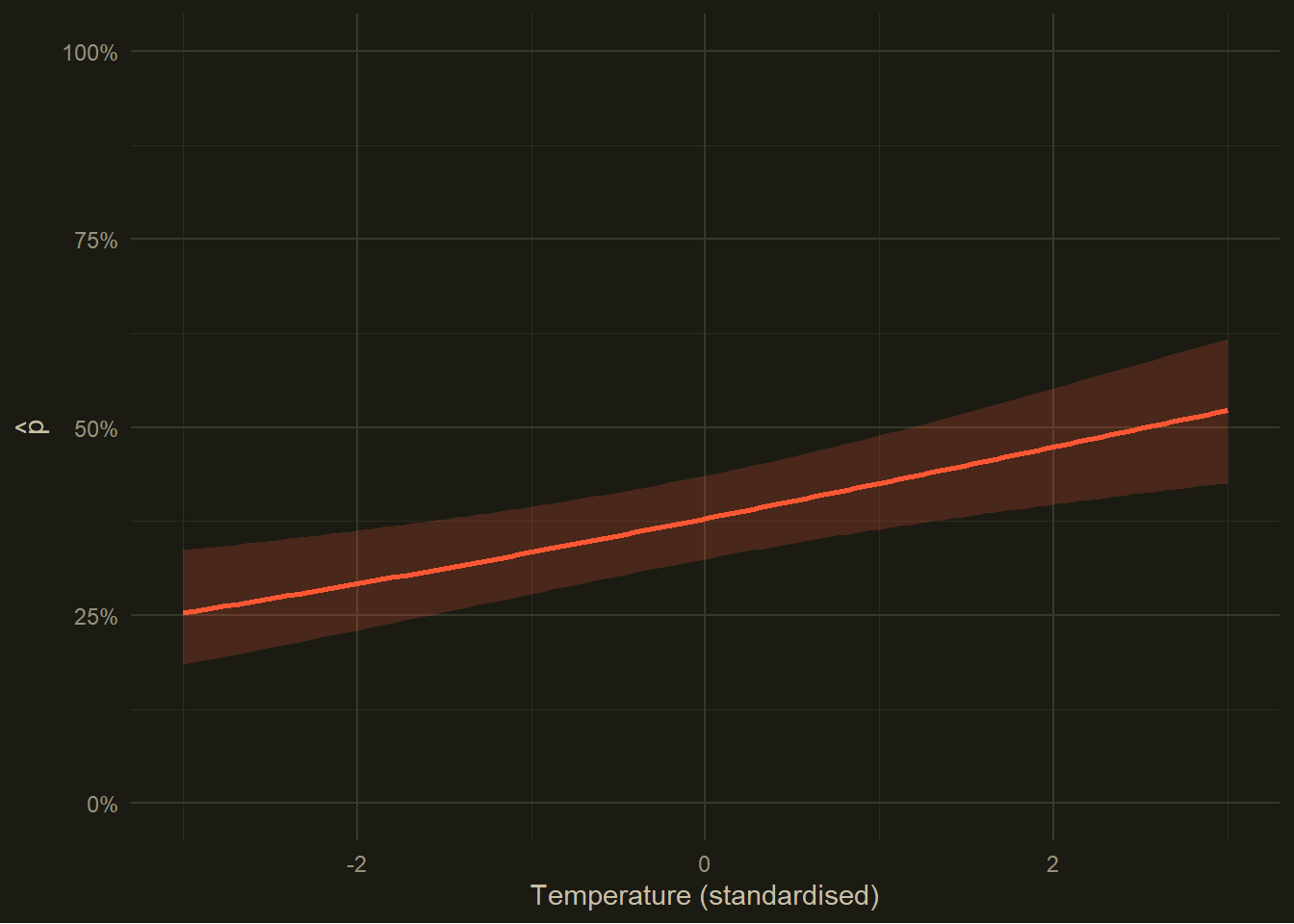
That confidence band comes from the delta method, carrying the uncertainty in both the intercept and the slope through the inverse-logit squash. What you’re looking for is whether the band would clear a flat horizontal line: if the lower edge sits clearly above, or the upper edge clearly below, some reference probability, that’s a sign the effect is real and not just noise.
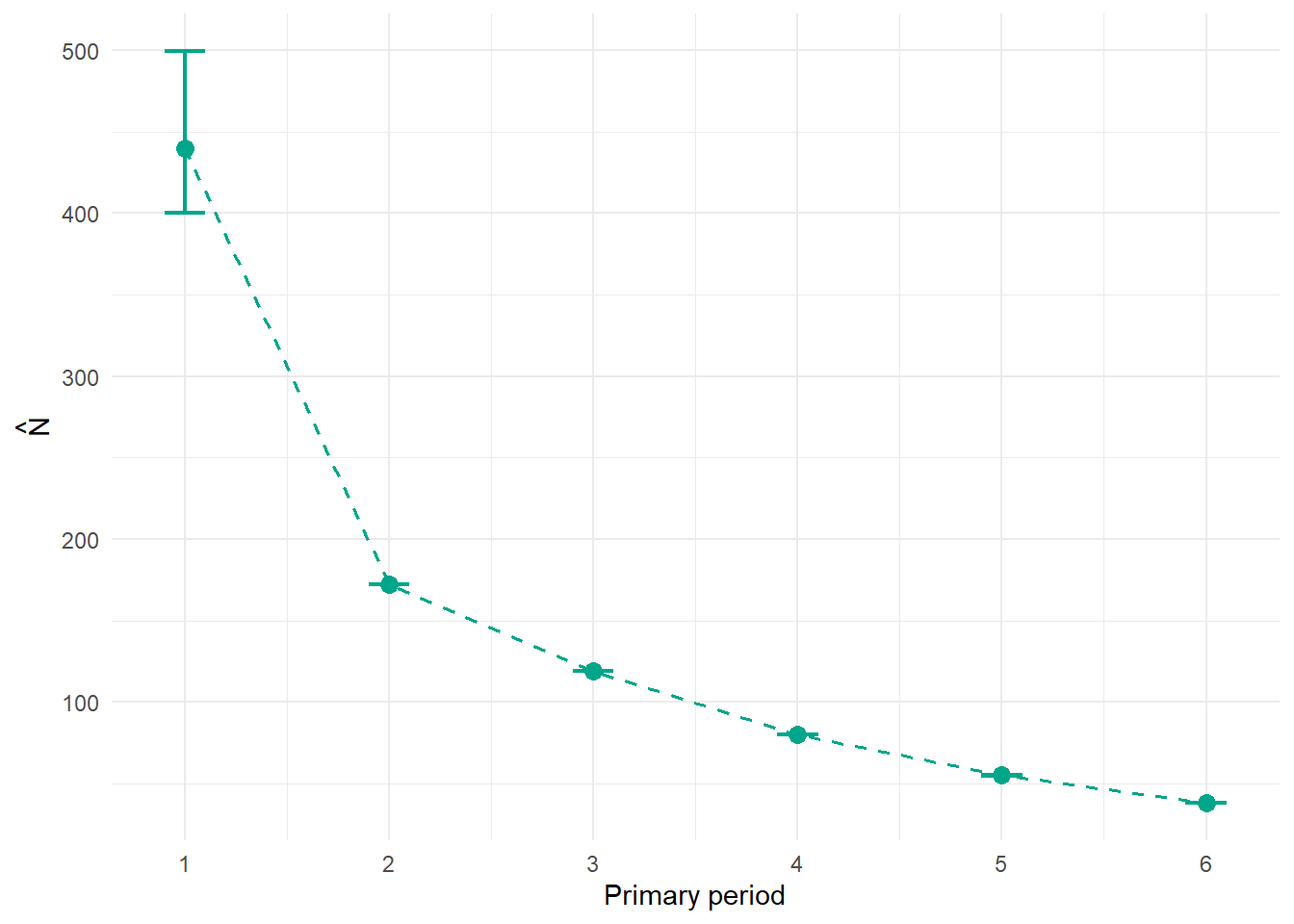
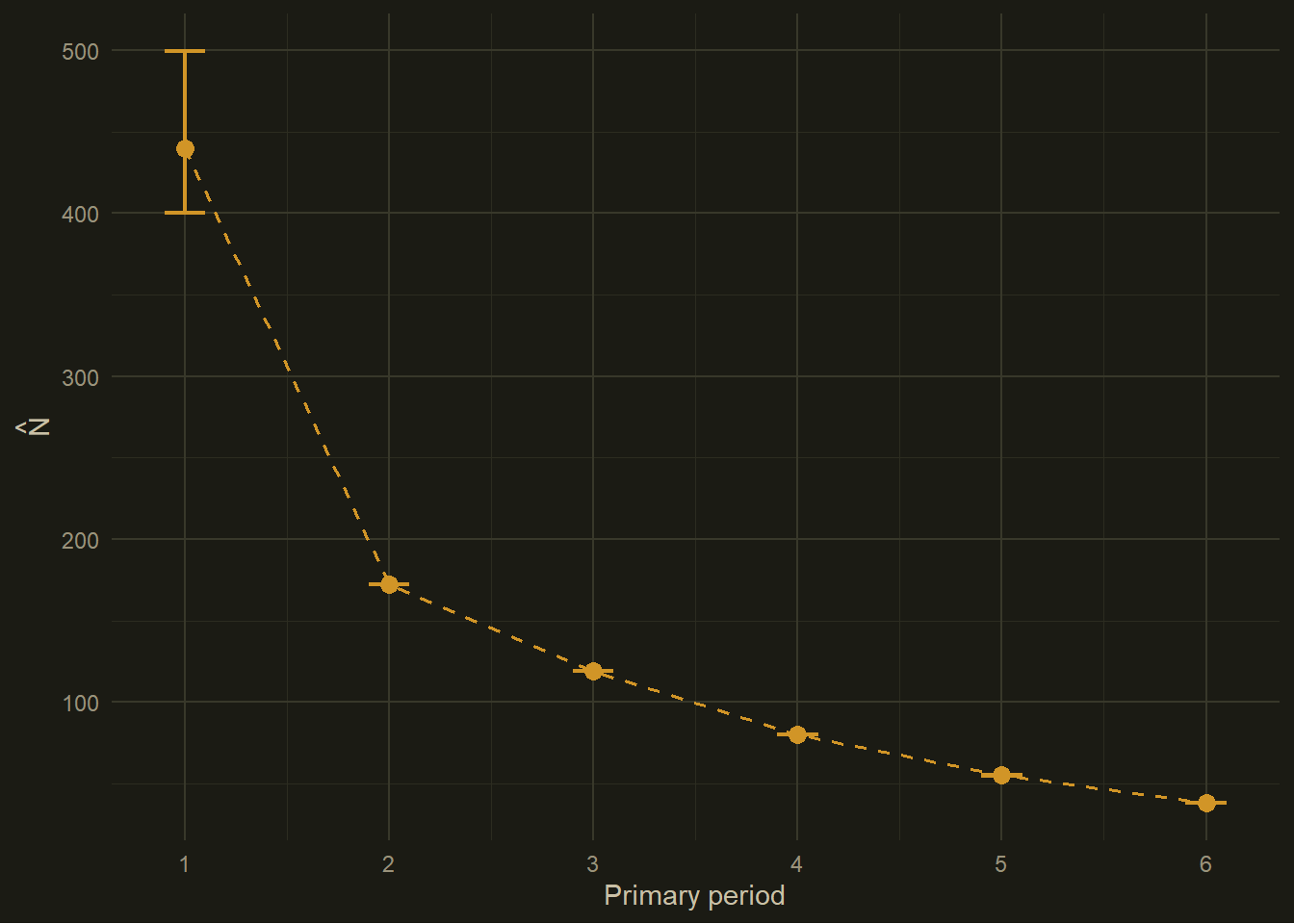
The per-period population size \(\hat{N}_t\) is one of the headline numbers a robust design study exists to produce. RMark builds it from the f0 parameter, which is its estimate of how many animals were there but never once detected in a given primary period. Add that to the number you actually counted and you’ve got \(\hat{N}_t\).
This plot is your population trend across the study, already corrected for imperfect detection. If it slopes downward, that’s not just you getting worse at spotting animals as the years go on. Because \(p\) is estimated on its own, the \(\hat{N}_t\) values track genuine changes in abundance. For most conservation work, this is the number everything else was building towards.
A note on your real data
Everything above ran on simulated data where we already knew the true answers. Once you’re working with your own data, a handful of practical things will bite you if you’re not careful.
Standardise your continuous covariates. Subtract the mean, divide by the standard deviation, before you fit. Two reasons. MARK gets numerically twitchy when covariates are on wildly different scales and can just fall over. And standardised coefficients are comparable in size, which really matters at write-up time: a coefficient of 0.3 on a standardised covariate is something you can talk about, whereas a coefficient of 0.003 on rainfall-in-millimetres is a number nobody, you included, will be able to make sense of.
Check for missing covariate values. RMark does not cope gracefully with NA in covariates. Either impute them or drop those individuals before you call process.data().
Get your time.intervals matching your data exactly. The single most common source of baffling RMark errors is the length of the capture history strings not matching the length of time.intervals. Use the build_time_intervals() helper from above instead of hand-typing the vector and hoping.
Keep your raw data and your RMark data frame apart. You’ll almost certainly want the original back later for plotting, checking, or sharing, so don’t overwrite it in place.